

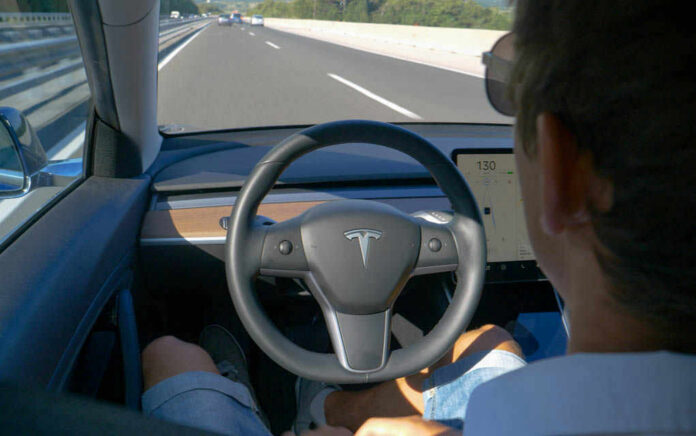
The central safety problem with in‑car touchscreens is not that they are new or flashy, but that the way they demand drivers’ eyes and minds clashes directly with the realities of controlling a moving vehicle at speed.
At a Glance
- Controlled experiments now quantify how dashboard touchscreens measurably degrade lane keeping, reaction time, and task performance compared with baseline driving.
- Touch interfaces consistently take longer to use and require more visual search than physical buttons and knobs, magnifying distraction and off‑road glance time.
- Some studies find no difference in total glance time or lane position when comparing traditional displays to larger touchscreens, highlighting that interface design and training matter.
- Regulation has lagged far behind adoption: almost all new vehicles rely on touchscreens for core functions despite mounting evidence of safety trade‑offs.
Why Touchscreens Change the Risk Equation
Driving is a continuous control task: you are simultaneously tracking lane position, speed, surrounding vehicles, and unexpected hazards, while making dozens of small steering and speed corrections every minute. Human factors research has long shown that this kind of dynamic control degrades quickly when visual and cognitive attention are diverted to secondary tasks. Modern infotainment touchscreens do exactly that. They shift simple, once‑tactile operations—adjusting climate, changing audio source, selecting a navigation destination—into visually complex, menu‑driven interactions that demand sustained gaze and decision‑making.
Recent work from the University of Washington and Toyota Research Institute puts hard numbers to this intuition. In a driving simulator, participants completed touchscreen tasks while “driving” a virtual vehicle; the researchers found that when drivers interacted with the touch screen, they drifted side‑to‑side in their lane 42% more often than during baseline driving. Touchscreen performance itself deteriorated as well: accuracy and speed dropped by 58% while driving, then declined another 17% when a memory task increased cognitive load. In other words, multitasking behind the wheel made people worse both at driving and at using the screen.
These results are consistent with a broader human‑machine interface pattern: when you force a driver to visually search a complex screen while the car is moving, they pay a price in vehicle control. Larger touch targets did not fix that problem in the UW/TRI study; the bottleneck was the visual search time after glancing back from the road, not finger precision. That distinction matters because it undercuts a common design response—“we’ll just make the icons bigger”—and refocuses attention on layout simplicity and minimizing required visual exploration.
What the Broader Evidence Says About Distraction
The UW/TRI findings do not stand alone. A growing body of studies has compared touchscreens to physical controls in terms of distraction and usability. A 2024 review in a human factors journal synthesized multiple experiments and concluded that touchscreens generally perform worse than physical controls for core driving tasks, with only narrow exceptions. Across studies, touch interfaces tend to require longer interaction times and more visual attention than a well‑designed array of buttons and knobs.
Older work, and the 2022 Swedish study described in media reports, points in the same direction: simple operations like adjusting seat heaters or temperature often take roughly twice as long on a modern touchscreen as on a conventional, button‑heavy dashboard. In that Swedish testing, drivers familiar with their own vehicles still needed dramatically more time to complete basic tasks in newer cars with centralized screens than in an older Volvo with dedicated physical controls. While the primary paper is not widely accessible, these reported results align with the more recent UW/TRI data and with systematic reviews of touchscreen usability.
Independent of the interface type, the longer a task pulls your eyes from the road, the more dangerous it becomes. AAA Foundation work on infotainment systems has documented that some built‑in touch systems keep a driver visually and cognitively engaged for up to 40 seconds—long enough to travel about half a mile at highway speeds. That kind of sustained distraction is exactly the scenario underlying many rear‑end and lane departure crashes. Even without direct crash‑rate attribution to specific screen designs, the mechanism is clear: extended off‑road glance time and divided attention increase the likelihood that a driver will miss a critical event and have too little time left to respond.
Competing Evidence: Are All Touchscreens Equally Bad?
Not all research paints touchscreens as uniformly catastrophic, and it is important to weigh that nuance honestly. A simulator study from the University of Iowa compared a traditional in‑vehicle display to a newer, large touchscreen layout. Researchers measured glance behavior, lane position variability, and perceived workload. They found that while the large touchscreen produced fewer individual glances (3.6 vs. 4.9 on average), each glance lasted slightly longer (1.53 seconds vs. 1.25 seconds). Crucially, total glance duration and lane position variability did not differ significantly between the two setups, and drivers did not report higher workload with the large screen.
This is not a refutation of the UW/TRI results so much as a reminder that interface details matter. The Iowa study looked at two specific designs for the same tasks and found that simply enlarging and reorganizing onscreen information did not necessarily worsen measurable distraction. That suggests the danger is not inherent to glass as a medium; it lies in how much searching, menu navigation, and visual decoding the system demands while the vehicle is moving.
Another piece of nuance comes from work on training. A ScienceDirect study examined whether short, instructor‑led training on using an in‑car touchscreen could reduce distraction. Early findings indicate that familiarity with the layout and task sequences can mitigate some of the negative effects—drivers spend less time searching and make fewer corrective inputs when they understand the system in advance. Training, however, operates at the margin; it cannot change the fundamental fact that any visually demanding task competes with the need to monitor the road. The UW/TRI work still found substantial degradation even though participants became more familiar over repeated trials, underscoring that design and task demands set a hard floor on risk.
Mechanism: Why Physical Controls Still Have Safety Advantages
To understand why buttons and knobs persist as a benchmark for safety, it helps to look at how drivers interact with them. A well‑designed physical control layout supports what ergonomists call “eyes‑free” operation: once a driver has learned where the climate dial or radio preset buttons are, they can reach and adjust with minimal or no visual confirmation. Tactility—the feel of a textured knob, the detent of a rocker switch—means the control itself communicates state and movement through touch.
Touchscreens strip away that tactile channel entirely. Every interaction requires a visual check: is the right page open, is the slider in the correct position, did the tap register? The UW/TRI study documented a “hand‑before‑eye” phenomenon in which drivers increasingly reached toward controls before looking at them as cognitive load rose, with such reaches climbing from 63% to 71% under added memory tasks. On a touchscreen, those blind reaches often miss, forcing the driver into repeated taps and additional glances. On a physical button, by contrast, a blind reach is far more likely to succeed, with the tactile feedback confirming a successful press.
When you add nested menus, multifunction screens, and visually dense layouts, the interaction cost rises further. Each layer—choosing the right menu, identifying the correct icon, confirming its state—adds seconds of off‑road gaze. Even if total glance time in a lab study does not cross a specific regulatory threshold, the combination of visual search and ongoing vehicle control is less forgiving than a single, brief press of a familiar button at the edge of a driver’s visual field.
Industry Adoption, Cost Incentives, and Regulatory Lag
Despite these concerns, touchscreens have become nearly universal in new vehicles. Recent reporting notes that the vast majority of cars sold since 2023 include at least one central touchscreen handling multiple functions, and owner surveys such as those from JD Power show these systems are among the most common sources of frustration and complaint. The reasons are familiar in automotive history: screens are cheaper and more flexible than arrays of individual, wired physical controls, and they give cabins a “futuristic” look that manufacturers believe sells cars.
Regulation has not kept pace. In the United States, NHTSA issued voluntary guidelines in 2013 recommending that any in‑vehicle visual‑manual task be completable in under 12 seconds total, with individual glances limited to two seconds or less. Those guidelines, like similar documents from Transport Canada, emphasize minimizing distraction but carry no enforcement power. Without binding standards, automakers are free to design interfaces that push those limits or encourage drivers to perform complex tasks while moving, as long as the base system can, in principle, be operated more quickly.
Complicating matters further is a legal and cultural double standard. Handheld phone use has been banned or sharply restricted in many jurisdictions, based on clear evidence that texting and app interaction while driving dramatically increase crash risk. Built‑in touchscreens, however, are permitted and often marketed explicitly as “safer than pulling out your smartphone” because they are nominally integrated and predictable. The empirical work shows that this safety claim is, at best, contingent: if a screen replicates smartphone‑like complexity—apps, notifications, video conferencing—the distraction mechanism is fundamentally similar.
Where the Evidence Leaves Us Today
Putting these strands together, the weight of current evidence supports a clear conclusion: multitasking with in‑car touchscreens significantly impairs driving performance, particularly lane keeping and reaction time, and often makes the touchscreen tasks themselves slower and less reliable. Simulator studies have limitations, and we still lack large‑scale, crash‑rate epidemiology tying specific screen designs to accident frequency, but the behavioral data are strong and consistent enough to justify concern.
The counter‑evidence does not exonerate touchscreens; instead, it highlights design and training as levers. Interface layouts that reduce visual search, avoid deep menu nesting, and keep high‑frequency controls on or near the periphery of the driver’s view can mitigate some risks. Brief, targeted training can help drivers build a mental map of the system before they are immersed in traffic. Those measures, however, work around an underlying mismatch between rich, visually driven digital interfaces and the sparse, low‑demand interactions that safe driving permits.
For now, the practical implications are straightforward. If you are driving, treat the central screen with the same caution you would a phone: set up navigation and audio before you move, avoid scrolling through menus in motion, and be skeptical of any feature that encourages prolonged on‑screen interaction while the vehicle is underway. For regulators and designers, the evidence argues for a renewed look at hard limits on on‑the‑move functionality, minimum physical controls for critical tasks, and usability testing that prioritizes lane keeping and glance behavior over aesthetic novelty.
Looking Ahead: What Would Safer In‑Car Interfaces Look Like?
Over the next decade, the question is not whether cars will have screens—they will—but whether those screens can be reconciled with the realities of human attention and motor control. The most promising direction is hybridization: retaining tactile, dedicated controls for core driving functions (lights, wipers, defrost, basic climate, audio volume) while using screens for low‑frequency, setup‑oriented tasks that drivers can complete while stationary. Emerging research on “smart” dashboards that combine context‑aware physical controls with simplified visual layouts points toward interfaces that adapt to driving conditions, suppressing complex options when the vehicle is in motion.
Ultimately, the core insight is simple. Cars are not smartphones on wheels; the cognitive demands and consequences of a moment’s inattention are categorically different. As the UW/TRI work and related studies continue to accumulate, the burden of proof is shifting. The question is no longer whether touchscreens can be distracting—it is which screen designs, in which contexts, can meet an acceptable safety threshold, and which functions should never be available while the vehicle is moving at all.
Sources:
washington.edu, cedtechnologies.com, youtube.com, facebook.com, sciencedirect.com, reddit.com, pubs.lib.uiowa.edu
© theredwire.com 2026. All rights reserved.